
Citra multiplayer lets you play 3DS games online, over the internet. You can join a public room, host your own, or connect straight to a friend. This guide shows how to set each one up, what you need, and how to fix the common connection problems. Some public features are less reliable now, and we explain why.
Does Citra have multiplayer?
Yes. Citra supports online multiplayer for 3DS games. It works by turning local wireless play into internet play. You join a shared room, and everyone in it plays together as if sitting side by side. You can join a public room, make your own, or link straight to a friend.
How Citra multiplayer works
The 3DS used local wireless for many multiplayer games. Citra copies that, but over the internet. A room is a shared session that players join. Local wireless means the short-range link two consoles used in the same place. Citra stretches that link across the web, so distance no longer matters. Everyone still needs the same game.
What you need for multiplayer
A short checklist:
- The same game as the other players, ideally the same region.
- A nickname to show in the room.
- For public rooms, a free web service account, explained below.
- For hosting over the internet, a small router change called port forwarding.
New to the emulator? Start with our how to use Citra guide first.
How to join a public room
Open the Multiplayer menu, then Browse Public Game Lobby.
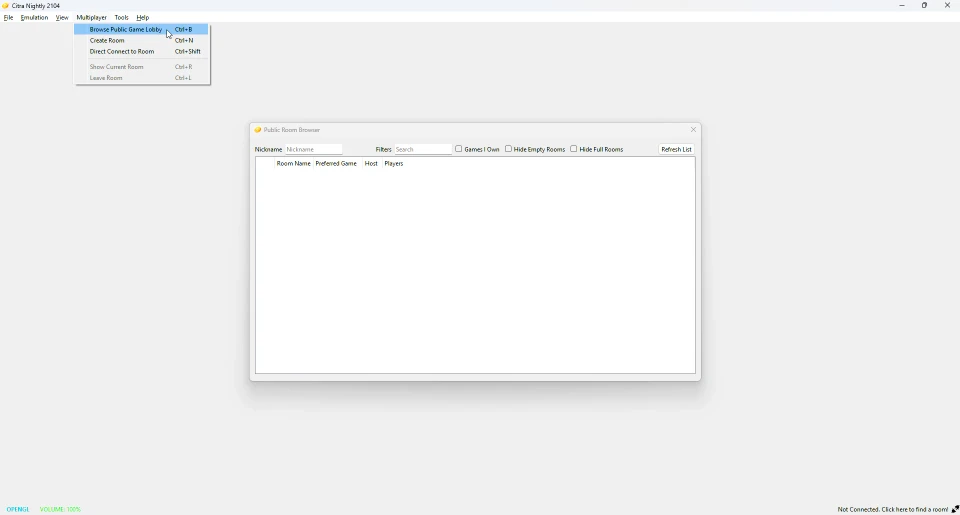
A list of rooms opens. Each row shows the room name, the game, the host and the player count. Use the filters to hide full or empty rooms. Type your nickname, pick a room, and join. If it shares your game, you are ready to play.
How to host your own room
Open the Multiplayer menu, then Create Room. Set a room name and pick your game. To let friends join over the internet, you forward the room port on your router. Citra shows the port when you create the room. Once it is open, share your details and your friends can connect.
How to connect directly to a friend
For a quick private game, use Direct Connect to Room. The host creates a room, then shares their address and port. You type those in and connect straight to them. This skips the public list, which is handy for playing with just a few friends.
Set up the Citra web service
Public rooms use a free web account. Open Emulation, then Configure, then the Web tab.
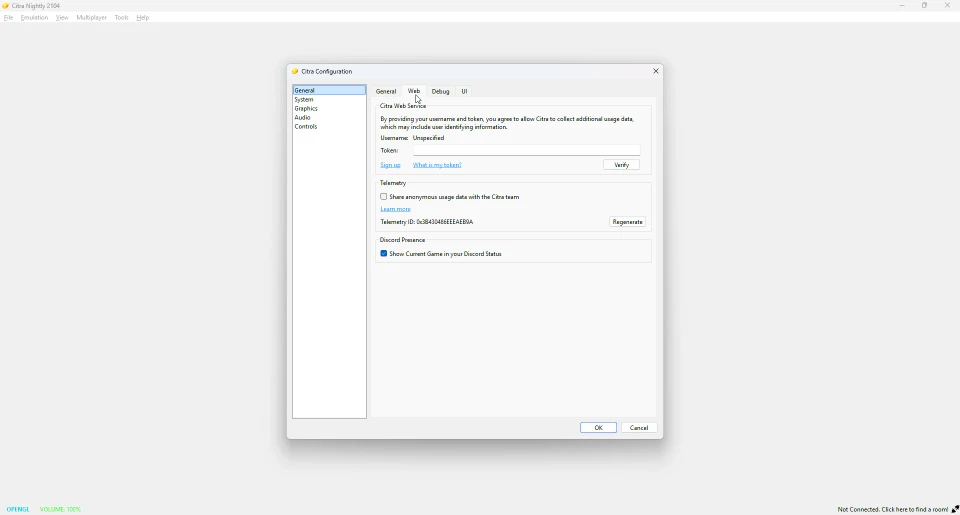
Enter your username and token, then click Verify. You get these by signing up through the link on that screen. This step is only needed for public rooms, not for direct connections.
Is public multiplayer still reliable?
Here is the honest answer. Direct connections and private rooms are the most dependable, because they link players straight to each other. Some public lobby features leaned on Citra’s own service, which is less reliable since the project closed. For steady public play, the maintained version is the safer bet. Azahar runs its own service and keeps online play working. See our Citra vs Azahar page.
Multiplayer not connecting?
Most connection problems have simple causes:
- Players are on different game versions or regions. Match them.
- The host did not forward the room port. Set that up on the router.
- A firewall is blocking Citra. Allow it through.
If it still fails, try a direct connection first, since it has fewer moving parts. Our troubleshooting guide covers more.
Does multiplayer work in Azahar?
Yes, and more reliably. Azahar continues Citra’s multiplayer and runs its own service. The steps are the same as above. If online play matters to you, Azahar is the stronger choice. Learn more on our Citra vs Azahar page.
Frequently asked questions
How do I play Citra online?
Open the Multiplayer menu, join a public room or create one, and make sure everyone has the same game.
Do I need port forwarding for Citra multiplayer?
Only to host over the internet. Joining a room or using a direct connection does not need it.
Why can’t I connect to a Citra room?
Usually a game mismatch, a closed port, or a firewall. Match versions, forward the port, and allow Citra through.
Is Citra multiplayer free?
Yes. Multiplayer is free, and the web account for public rooms is free too.
Can I play with friends far away?
Yes. Citra stretches local wireless play across the internet, so distance does not matter.