
If Citra is not working, most problems have a quick fix. Black screens, crashes, no sound and games that will not load usually come from a few common causes. This guide covers each one, with the exact steps to fix it. Find your issue below and follow the fix.
Citra will not open at all
First, match the fix to your system.
- On Windows, a missing
.dllerror means you need the Microsoft Visual C++ Redistributable. Install it, then try again. Our Windows guide has the steps. - On Mac, macOS may block it. Control-click the app and choose Open, or allow it in Privacy and Security. Our Mac guide shows this.
- On Linux, make the AppImage executable, and install FUSE if needed. See our Linux guide.
If it still fails, your download may be broken. Get a fresh copy, and check the SHA-256 value before opening.
Citra shows a black screen
A black screen almost always points to the game file. The file may be incomplete, unsupported, or encrypted. Re-dump the game from your console and try again.
If many games show a black screen, update your graphics driver instead. Some games also need system files from your 3DS. Our how to get games guide covers dumping cleanly.
Citra is slow or laggy
Speed problems have their own guide. The main fixes are turning on hardware shader, using the disk shader cache, and lowering the resolution. Our best settings guide walks through every performance option in order.
Citra keeps crashing
Crashes usually come from three things. Update your graphics driver first. Next, check the game file is complete, and re-dump it if needed. Then turn on Use Disk Shader Cache in the graphics settings. If crashes continue, switch between OpenGL and Vulkan and keep the one that is stable on your device.
A game will not load or does not appear
If a game is missing from the list, check the folder. It must sit in the folder you added, and it must be a supported type like .3ds or .cia.
If the game is listed but will not start, the file may be encrypted or incomplete. Re-dump it from your own console. Our how to get games guide shows the correct way.
There is no sound
Start with the basics. Check that your device volume is up. Then open Configure, then Audio, and confirm the output is set. Turn on Enable audio stretching to stop crackles when the frame rate dips. If one game has no sound but others do, the game file may be the cause.
Citra says it cannot decrypt a game
This means the game is encrypted, and Citra is missing the keys or system files it needs. You supply these from your own 3DS.
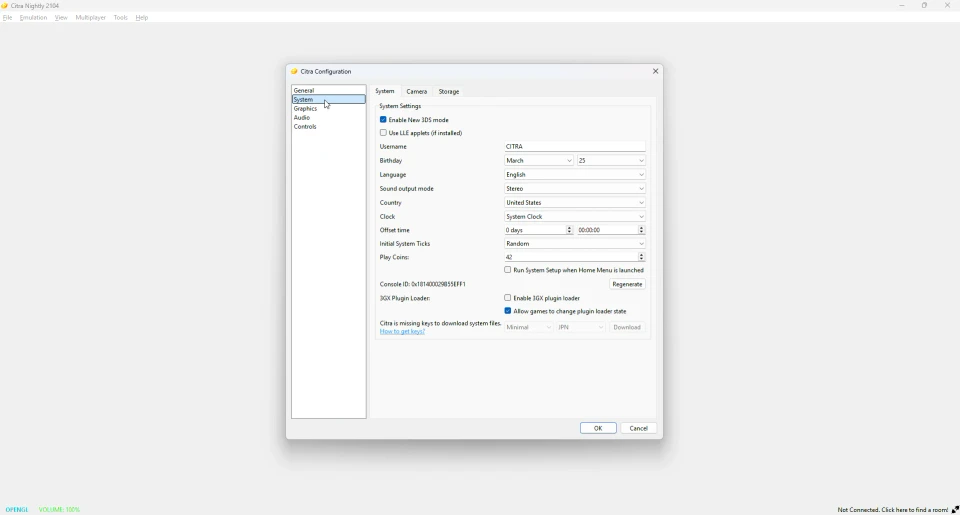
Once you add the right system files, encrypted games load correctly. Our system files guide walks through it step by step.
Controls are not working
Open Emulation, then Configure, then Controls. Set each button, or use auto-map for a connected controller. If a controller is not detected, reconnect it before you open Citra. Our controls guide lists the full default layout.
Save data is missing
Saves live in Citra’s own folder. If your saves vanished, they were likely moved or deleted outside the app. Do not rename game files after saving, since Citra links saves to the file name. If you switch to Azahar, your saves carry over, because it uses the same layout.
Multiplayer will not connect
Direct connections between friends work best. To host a public room, you may need to forward a port on your router. Some public lobby features are less reliable now, since the closed project ran part of them. For steady online play, the maintained version is safer. See our multiplayer guide.
Still not working? Try the maintained version
Many problems on the frozen Citra are already fixed in Azahar. It is the same code, kept up to date. If you have tried the steps above and a game still fails, install Azahar and test it there. See our Citra vs Azahar page.
Frequently asked questions
Why is Citra not opening?
Usually a missing system component or a broken download. Install the needed files for your system, or re-download and verify.
Why does Citra show a black screen?
The game file is usually incomplete, unsupported or encrypted. Re-dump it, and update your graphics driver.
Why will my game not load in Citra?
Check that it is in the right folder and is a supported type. Encrypted files need system files from your console.
Is Citra broken now?
No. Citra still works. It just does not get fixes, so some issues only get solved in Azahar.
Does Citra still work?
Yes. The last build still runs games. For anything it cannot fix, use the maintained version.