
To play games in Citra, you use your own 3DS games, dumped from a console you own. This is the legal way, and it gives you clean, working files. You do not download ROMs from other sites. This guide explains how it works, what files you need, and links to the exact steps for each type.
How do you get games for Citra?
You dump them from your own 3DS. Dumping means copying a game you own from your console into a file. Citra then plays that file. This is the proper way to get games, and it keeps everything legal and clean. You need a 3DS you own, the games themselves, and a little setup. We do not host games, and you should not download them from ROM sites.
Why not just download ROMs?
Two big reasons: law and safety. Downloading a game you do not own is illegal, even when a site makes it look normal. On top of that, ROM sites are risky. Many carry malware, fake files, or broken dumps that will not run.
Dumping your own game avoids all of this. You get a clean file that matches your console, and you stay on the right side of the law.
What you need to dump your games
A short list:
- A Nintendo 3DS that you own, set up to run homebrew software.
- The games you want, as cartridges or as digital titles you bought.
- An SD card and a way to read it on your PC.
- A little time for the first setup.
The homebrew setup is what lets your 3DS copy its own games. It is a one-time job.
The file types Citra uses
Citra reads two main types. A .3ds file is a dump of a cartridge game. A .cia file is a dump of an installed or digital title. Both work in Citra. When you dump a game, you get one of these files, ready to load.
How to dump your games
The exact steps depend on the game type. Cartridge games and installed titles are dumped a little differently. Our dumping 3DS games guide walks through both, step by step, with safe, common tools.
System files some games need
A few games need extra files from your 3DS to run correctly. These include system data and shared fonts. Without them, some games show errors or missing text. You dump these from your own console too. Our system files guide explains which files you need and how to get them.
How to add your games to Citra
Once your files are ready, using them is easy. Move them to your PC or phone, then point Citra at their folder.
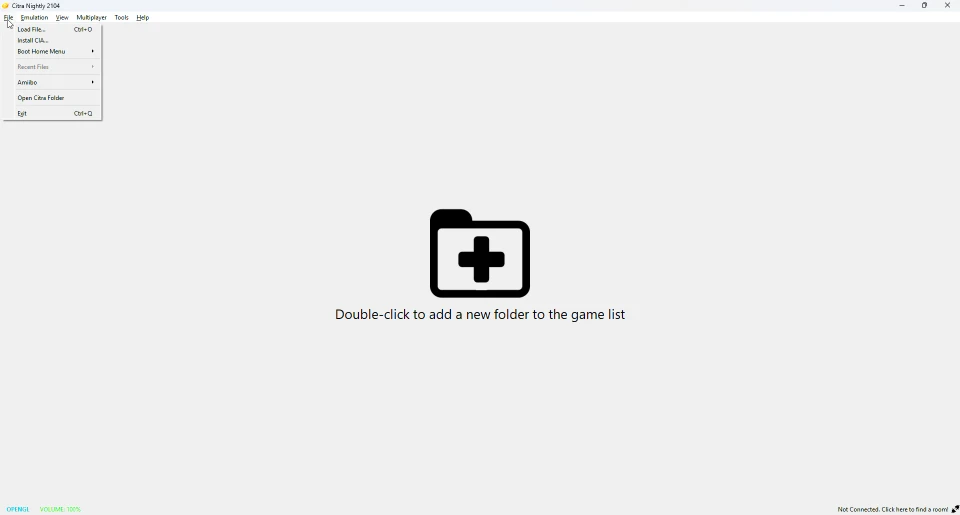
Use the File menu to load a game, or to install a .cia title. Our how to use Citra guide shows the full flow from here.
Do these games work in Azahar?
Yes. Azahar reads the same .3ds and .cia files as Citra. Your dumped games work in both, with no changes. See our Citra vs Azahar page for the wider comparison.
Frequently asked questions
Where do I get games for Citra?
You dump them from your own 3DS. Citra does not come with games, and you should not download ROMs.
Are Citra ROMs legal?
Downloading games you do not own is not legal. Dumping your own games is the legal way.
What game format does Citra use?
Citra uses .3ds files for cartridges and .cia files for installed or digital titles.
Do I need a real 3DS to get games?
Yes. You dump your own games from a 3DS you own. That is what keeps it legal and clean.
Can I use downloaded ROMs in Citra?
You should not. They are often illegal and unsafe. Dump your own games instead.